
Paceon
A wearable-first running experience that turns live performance data into glanceable, contextual guidance during a 5K.
Overview
Brief
Design a guided 5K experience for smartwatch and mobile, using live pace, heart rate, cadence, distance, and time.
Challenge
Runners have a lot of data available, but only a few seconds to look at their watch while moving. The challenge was deciding what they actually need to know in that moment.
Approach
I analyzed how existing running products handle live data and guidance, then used those insights to shape the experience around different moments of the run.
Outcome
An experience that brings the right information forward as the runner's state changes, making guidance easier to understand at a glance.
A Trigger
Running changes the way someone interacts with a screen.
IN MOTION
The runner is constantly moving, so looking at the watch and interacting with it needs to be quick.
LIMITED ATTENTION
Their attention isn't only on the screen. They're also thinking about their pace, effort, and surroundings.
A LOT OF DATA
Pace, heart rate, cadence, distance, and time can all be useful — but showing everything at once doesn't necessarily make it useful.
So I started with a simple question.
What does the runner actually need to know right now?
Why It
Mattered
QUICK TO READ
Important information should make sense within a quick glance.
CLEAR PRIORITY
Not every metric needs the same amount of attention at every moment.
INTERRUPT WITH A REASON
If the watch interrupts the runner, there should be something they need to know or do.
Research
I looked at Apple Watch, Garmin, COROS, Runna, Samsung, and Polar to see how they handle pace, heart rate, workout guidance, and alerts.
I noticed a tradeoff: some were easy to scan but offered less detail, while others gave runners more information but also more to interpret.
I wanted Paceon to sit somewhere in between.
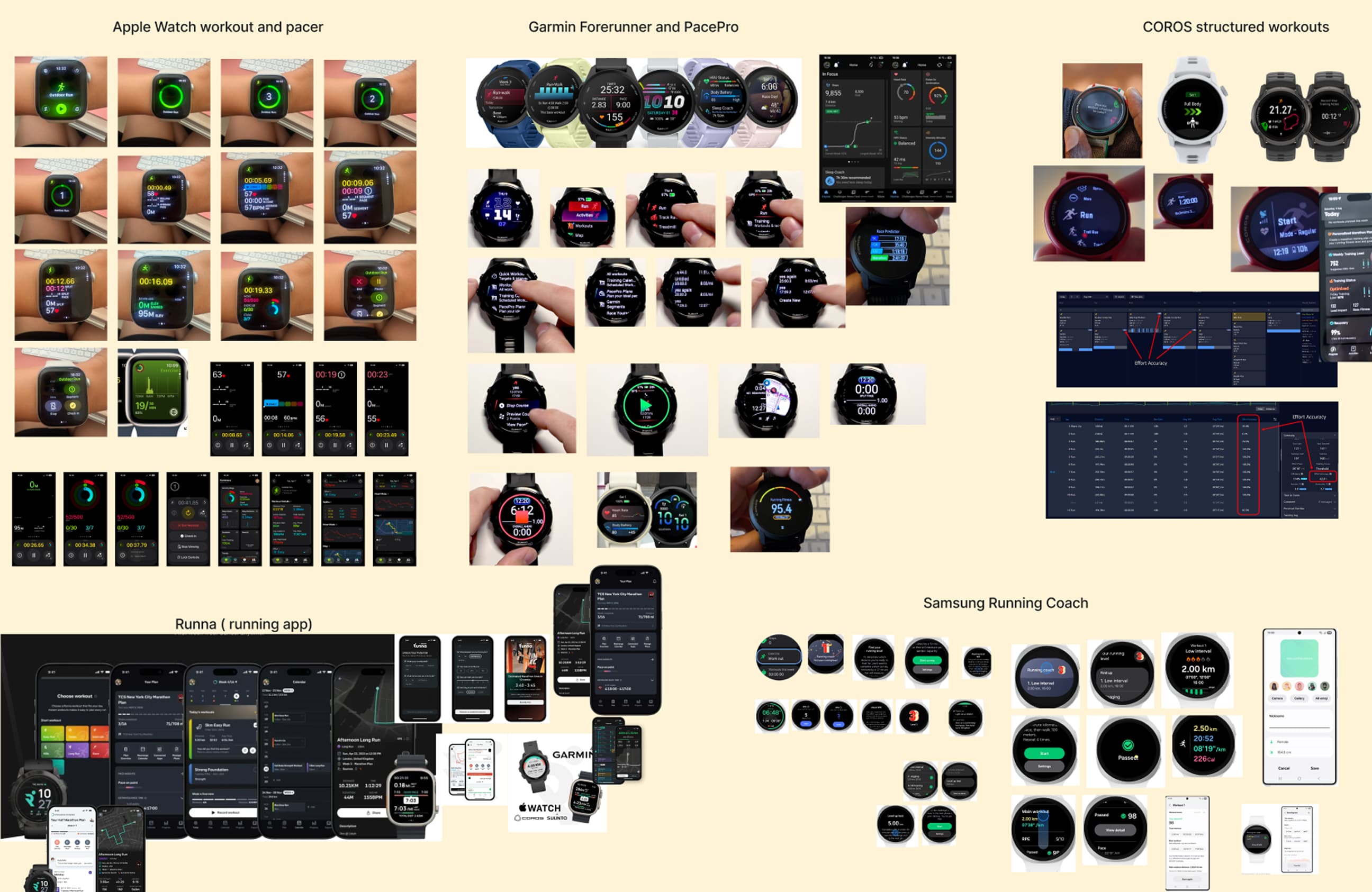
Competitive analysis
Enough information to understand what's happening, without turning the watch into a dashboard.
What I Learned
DATA ISN’T ALWAYS GUIDANCE
A pace of 6:18/km tells me how fast I'm running. It doesn't tell me whether I should change anything.
PRIORITY CAN CHANGE
Pace might matter most during a normal run. But if heart rate becomes too high, pace shouldn't still be the main focus.
WATCH ≠ PHONE
I didn't want the watch and phone to repeat the same information. The watch is for what's happening now. The phone can handle setup and more detail.
DON’T LEAVE THE RUNNER HANGING
If I tell the runner to slow down, I also need to tell them when they're recovered and what to do next.
This led to a simple model for the experience.
Data → Meaning → Action
Design Strategy
Designing Around the Moment
Instead of deciding which metrics should always be visible, I started thinking about what mattered in each moment of the run.
KEEP NORMAL SIMPLE
Show the essentials when everything is going as expected.
BRING GUIDANCE FORWARD
When something changes, make the message or action more important than the supporting data.
KEEP DEEPER INFO ON MOBILE
The watch handles the run. The phone handles setup and details.
SHOW THE WAY BACK
An alert shouldn't be a dead end. The runner should know when things are back on track.
Defining the Structure
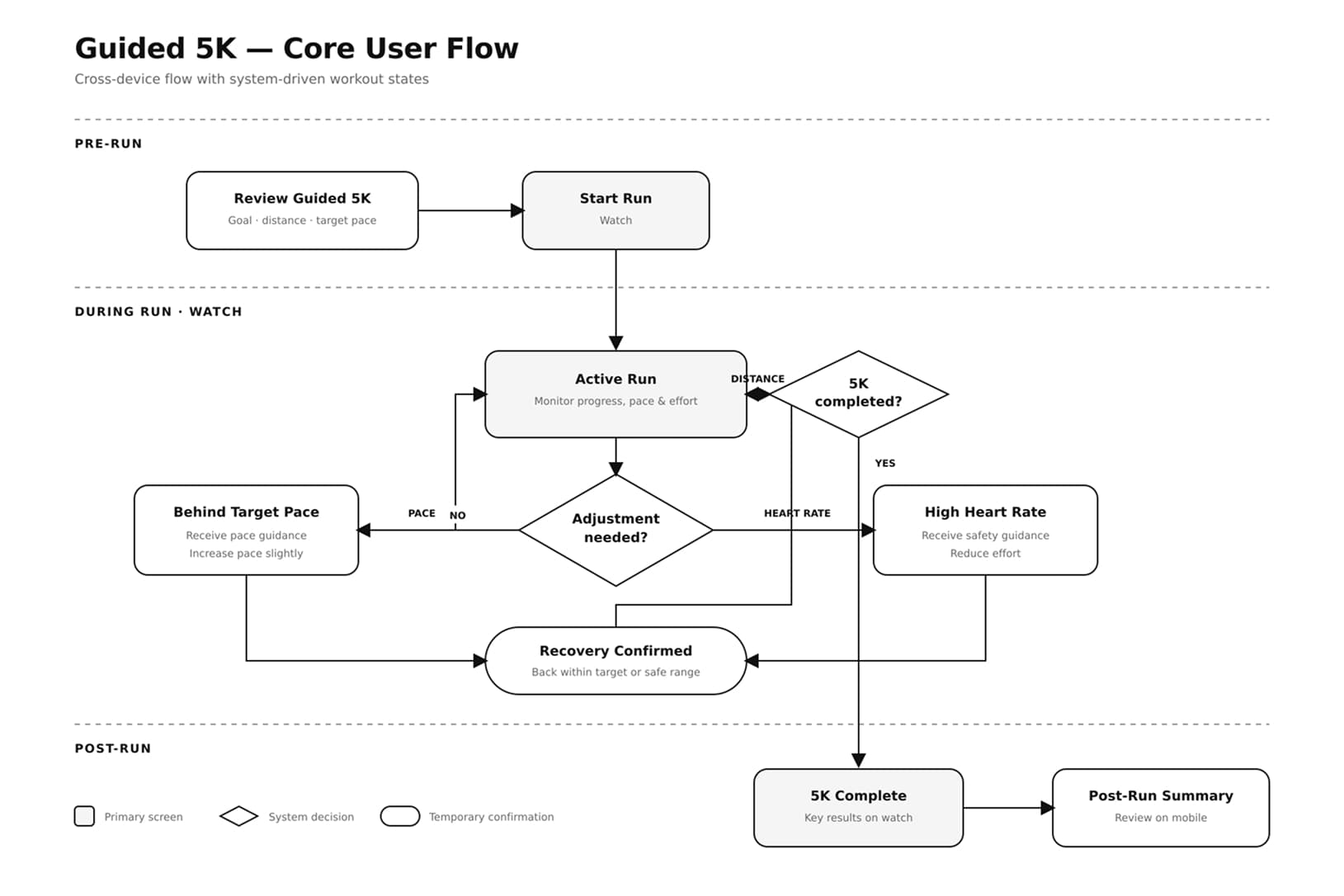
[Image — User flow]
I mapped how the experience changes as the runner moves through the run.
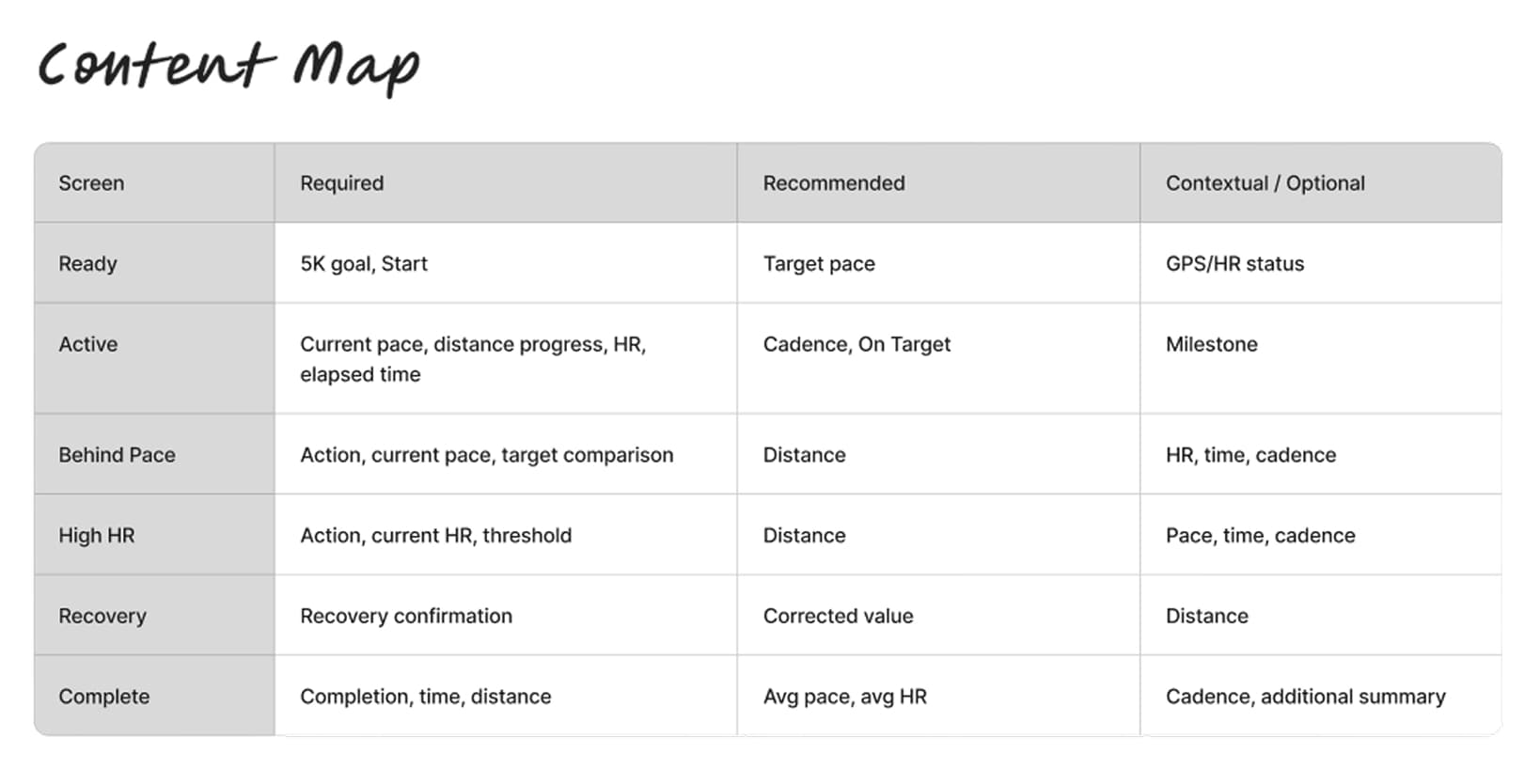
[Image — Content Map for watch]
I organized what the runner needs to see in each moment.
Design Exploration
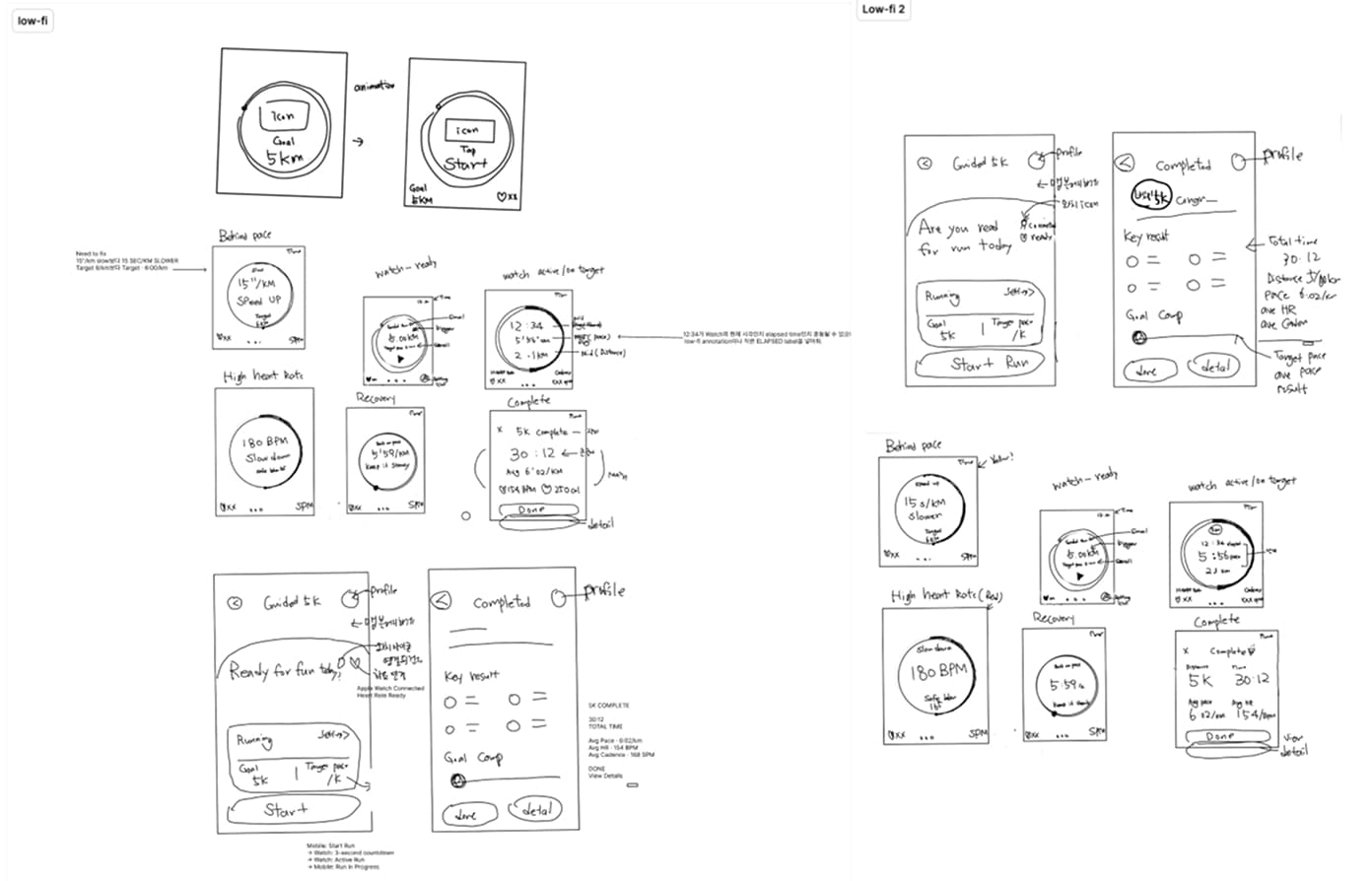
Low-Fi
I started by exploring how the hierarchy could change across different running states.
Watch Hi-Fi — V1
I brought the states into hi-fi, but some moments still asked the runner to process too much at once.
Final Solution
Before User Testing
After User Testing
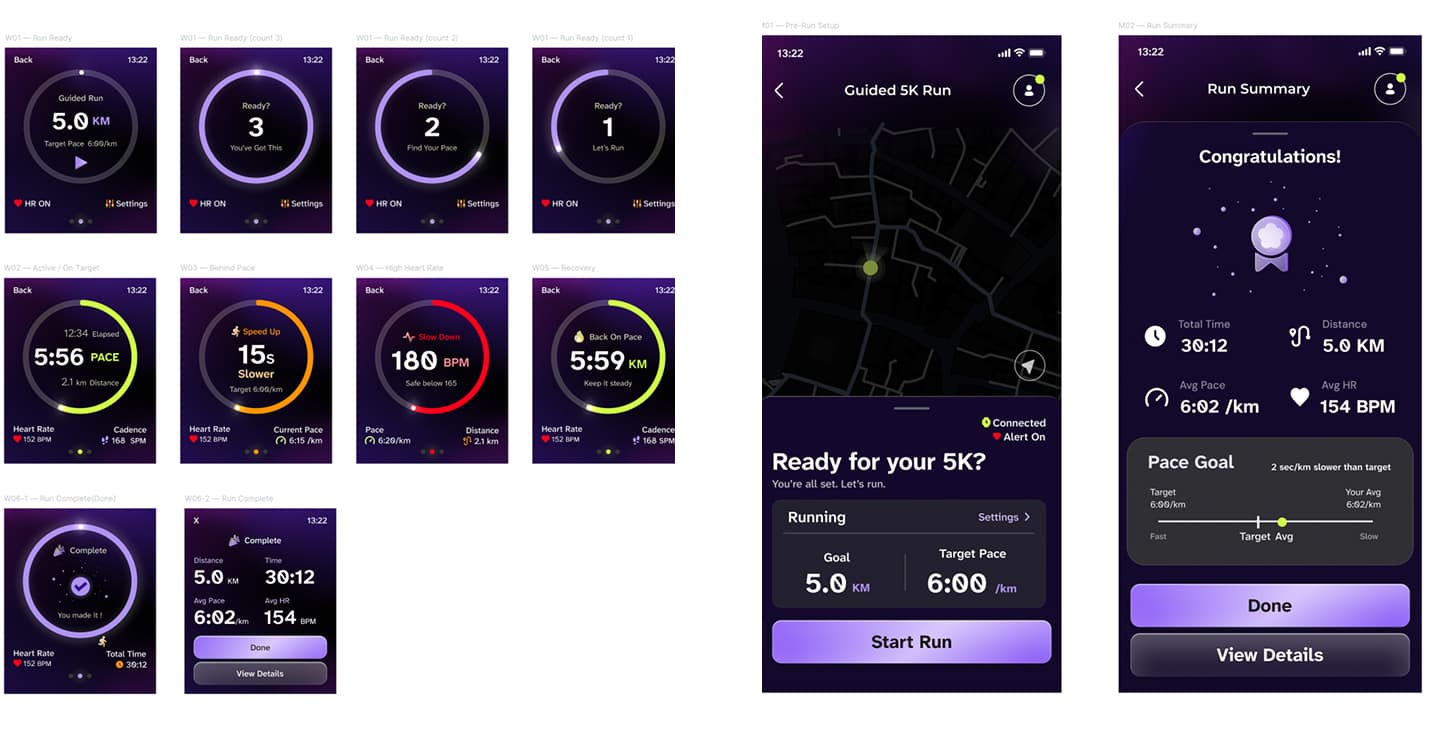
I simplified the experience around what matters most in each state, making guidance easier to recognize while running.
CLEARER FOCUS
Each state now makes it clear what the runner should pay attention to.
EASIER TO RECOGNIZE
Guidance stands out more clearly when something needs the runner's attention.
A WAY BACK
The experience doesn't stop at the alert. It also shows when the runner has recovered and what comes next.
Reflection
WHAT CHANGED
I started by thinking about what information should be on the watch. By the end, I was thinking more about what should matter in each moment.
WHAT I LEARNED
Simplifying the experience wasn't just about showing less. It was about making the right information easier to notice when it matters.
WHAT I’D TRY NEXT
I'd test the experience while runners are actually moving and explore how visual guidance could work with haptic and audio feedback.